Customers are the center of Accounts Receivable module.
The characteristics of a customer serve to create defaults on receipts and invoices. These defaults can be changed.
Efficient customer management is the key to proficient invoice and receipt processing.
In AR, customer characteristics can include:
Several of the customer's attributes are defaulted from the assigned organization, such as:
Accounts Receivable enables you to filter which customers appear in a listing.
An example of this is all customers in a particular territory.
The available selection criteria include the type of customer, status, analysis code, and several other customer attributes.
Accounts Receivable lets you group customers into business relationships.
This grouping practice links one customer to another which allows for consolidation reporting.
By grouping customers, you can:
You can use Accounts Receivable to classify customers according to customer profiles that you define.
Profile specifications include customer attributes and balance values.
With a profile, you can select the attributes for the customers to appear in a particular report.
Miscellaneous charges on a customer's invoice can be viewed online.
This function is helpful for those customers who may make a deduction for freight, tax, or other charges.
AR provides several contact names, phone numbers, and fax numbers for each customer.
The application lets you keep a record of all contacts with a customer, such as phone calls or written correspondence.
This customer notes area lets you keep a record of the contact date and person as well as the details of the conversation.
Accounts Receivable offers various methods of identifying customers:
Accounts Receivable helps you to view when an invoice is due.
The application automatically calculates payment due dates and discount due dates, based on invoice dates and payment terms that are defaulted at the customer level, but are also available at the invoice level.
Remember, while payment terms and discount terms can default from the customer, an invoice can accommodate any type of these terms.
Accounts Receivable provides several customer distinction codes as well as the following standard codes to assist in the selection and sorting of customers:
AR allows you to either manually or automatically send dunning letters to your customers.
You create the text and determine the severity level for each dunning letter.
For each customer, you can establish the reset terms for the dunning stage.
For example, if you have sent a customer three separate dunning letters and the customer pays you, the customer will automatically be returned to the first letter stage for future dunning, if you so desire.
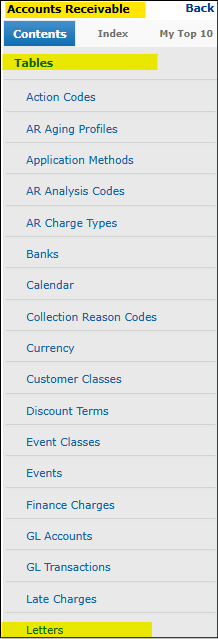
Under the Contents entry, Tables, select Letters to review, modify or enter Dunning or other types of letters.
Figure 1: AR -> Tables -> Letters
By selecting Edit (pencil icon), the details of the letter can be formatted.
Start in the Letter Text tab.
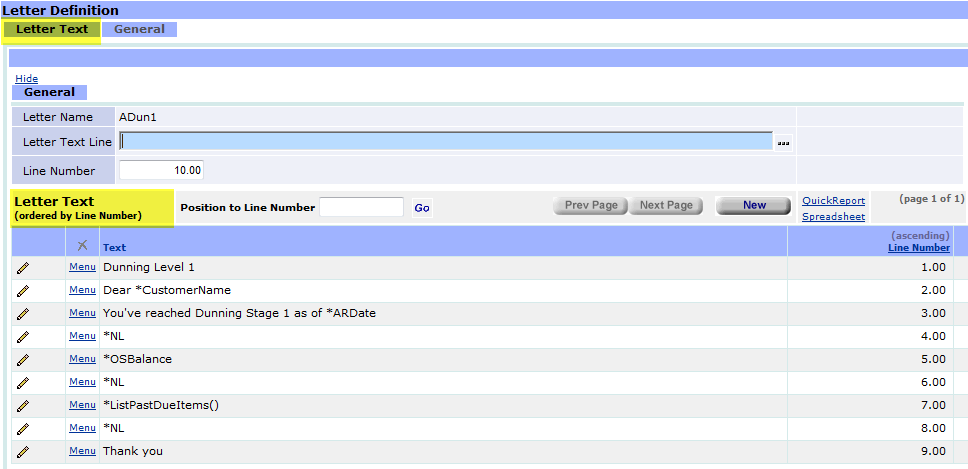
Figure 2: Editing Letters. Letter Text tab.
And in the General tab some other details are set, including whether if it's a dunning letter.
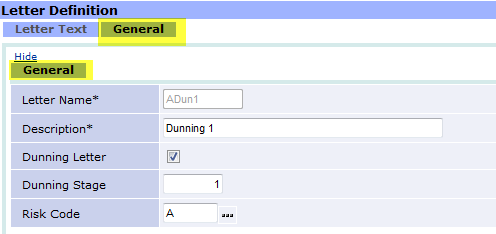
Figure 3: Editing Letters. General tab.